
Pools + load balancer
A Pool is a named group of adopted servers that all run the same workflow. Useful when one box runs out of headroom and you want to fan out without rewriting your deploy pipeline.
Anatomy of a pool
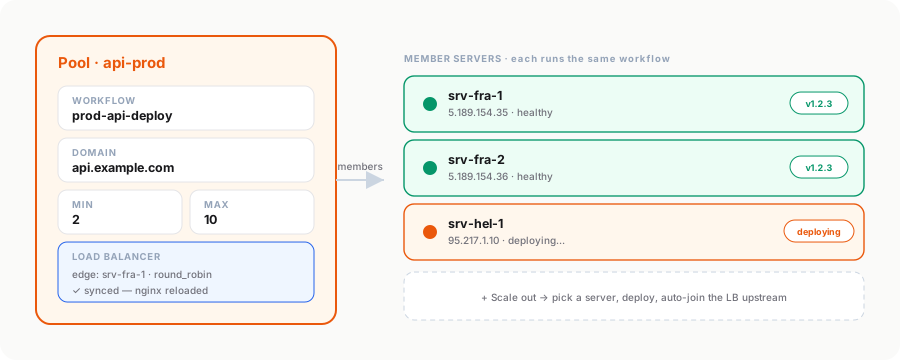
A pool bundles a workflow, an optional fronting domain, min/max replica hints, an optional edge load balancer, and a list of member servers — each of which runs the same workflow. Each member’s last-deploy status, runId, and healthcheck result are tracked separately so you can see at a glance which member is on which version.
Scaling out
The Scale out button on a pool detail page:
- Picks an already-adopted server that isn’t a member yet
- Adds it to the pool
- Fires the pool’s workflow against that server (using
serverOverride— same workflow, different target) - Polls the run until it terminates → updates the member’s
last_deploy_status - (If the LB is configured) Re-renders the nginx upstream block to include the new member, reloads nginx
In practice: provisioning a fresh VPS at your cloud provider, adopting it once, and then one-click adding it to a pool replaces what used to take ~20 minutes of manual config.
The built-in nginx load balancer
Once a pool has members, set an edge server + LB strategy in the pool detail drawer:
- Edge server — any adopted server. Mezzanine SSHes in to write
/etc/nginx/conf.d/mezzanine-pool-<id>.conf - Strategy —
round_robin(default),least_conn, orip_hash(sticky sessions) - Listen port — what the edge nginx binds (defaults 80; you can add 443 separately)
- Backend port — what the pool members serve on
Mezzanine then:
- Renders the upstream block with
server <ip>:<port> max_fails=3 fail_timeout=30sfor each member - Adds standard
X-Forwarded-*headers so apps see the real client IP nginx -tto validate, thensystemctl reload nginx- Records
lb_synced_at+ clearslb_last_erroron success
On membership change (add or remove member), the LB auto-syncs in the background — fire-and-forget so the API response isn’t blocked.
What’s NOT included
Honest scope:
- Health-based draining — nginx OSS only has passive healthchecks (
max_fails). Dead backends auto-removed from rotation after 3 failed attempts; recovered backends auto-rejoin afterfail_timeout. No active probing. - Multi-region pools — pools are flat; there’s no concept of geo-affinity
- Auto-scaling rules — Pools scale on a button click, not on a CPU threshold. Auto-scale (CPU > 80% → add member) is a future feature when there’s demand.
When to skip Pools
You don’t need pools if you’re running everything on a single box. The deploy workflow alone is fine. Pools earn their complexity when:
- You’re serving more traffic than one VPS can handle
- You want zero-downtime deploys via blue-green (deploy to half the pool first, then the other half)
- You want geo-distribution (members in different datacenters → users hit the nearest)