
Deploy workflows
A workflow is a named sequence of steps that runs on a target server. Steps are typed (not arbitrary shell scripts) so the UI can render per-step state, time the steps independently, and roll back cleanly if a step fails.
Step types
| Type | What it does |
|---|---|
git-pull | Clone if missing, else pull. Pin to a branch. Supports private repos via deploy keys. |
shell | Run any command over SSH with a configurable cwd. |
nginx-reload | sudo systemctl reload nginx (or nginx -s reload). |
http-healthcheck | curl a URL, retry N times with delay, expect 2xx. |
notify | Send a message to configured notification channels (Slack / Discord / webhook). |
approval | Pause the run until a moderator+ clicks Approve in the UI. |
That’s the entire vocabulary. Every workflow template is just a pre-filled sequence of these.
Triggers
A workflow can fire from:
- Manual — the Run button at the top of the workflow detail page
- Webhook —
POST /api/webhooks/<workflow-id>with HMAC-SHA256 signature (matches GitHub’s webhook format) - Scheduled — cron expression evaluated by a panel-side scheduler every minute
All three coexist on a single workflow. The Triggers modal in the UI lets you toggle each.
Wizard vs YAML
The “New workflow” UI runs a wizard — it picks a template, asks ~5 questions, and emits the step graph. The same shape can be edited directly (Workflow → Edit → steps array) if you’d rather hand-author.
The wizard also records its inputs as wizard_payload JSON alongside the workflow. If you later run the wizard again and pick different answers, the deploy step regenerates the graph deterministically.
Run lifecycle
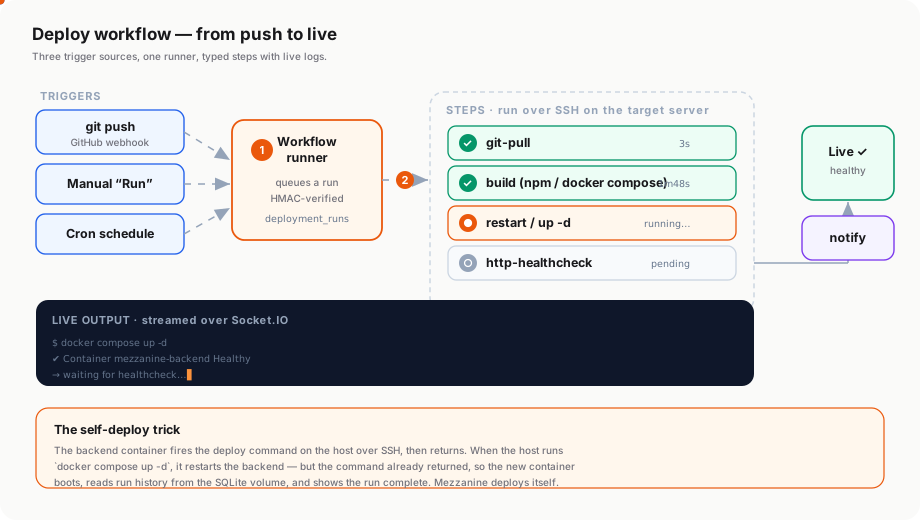
A trigger fires → the runner queues a deployment_runs row → the backend dequeues and walks the typed steps over SSH on the target, opening a deployment_step_runs row per step and streaming stdout/stderr over Socket.IO. A failed step aborts the run unless it’s marked continueOnError. On completion, configured notification channels fire.
Live logs stream over Socket.IO so the Runs detail page shows output as it happens.
Templates (14 stacks)
See Workflow templates for the full table. Each template ships a sane default for git_pull path, install commands, build commands, restart commands, and healthcheck URL — you only fill in the parts that are specific to your repo (URL + branch + maybe a port).
CI/CD on git push
Wire the webhook URL into your GitHub repo’s webhook settings → push to main → Mezzanine runs the workflow. Three deploy modes:
| Mode | Trigger |
|---|---|
| Auto | Webhook fires on every push |
| Manual | Click Run in the panel after pushing |
| Both | Webhook + button both work |
Most users want Both — webhook for normal pushes, button for redeploys and rollbacks.