
Workflow templates
When you create a new workflow, you pick a template — that fills in the step graph with sane defaults for that stack. Edit afterwards if you need to.
Every template — whatever the stack — is the same five stages. A template just plugs the right commands into each one:
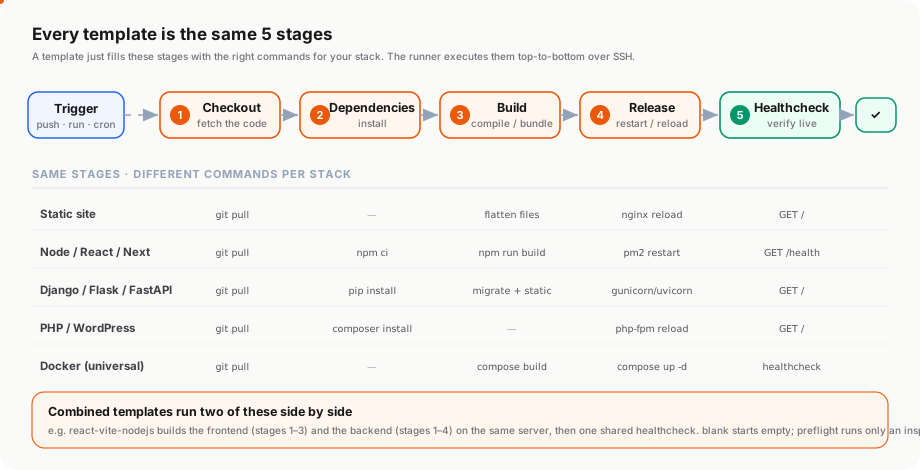
Single-app templates
| ID | Name | Default target path | Healthcheck | Notes |
|---|---|---|---|---|
blank | Blank | — | — | Empty graph; build it yourself |
static | Static site (pre-built) | /var/www/site | http://localhost/ | git pull → flatten → nginx reload. Good for landing pages. |
php | PHP app | /var/www/app | http://localhost/ | composer install → php-fpm reload |
wordpress | WordPress | /var/www/wp | http://localhost/ | theme/plugin pull → wp cache flush → php-fpm reload |
react | React (Vite / CRA) | /var/www/react | http://localhost/ | npm ci → build → nginx reload |
nextjs | Next.js | /opt/nextapp | http://127.0.0.1:3000/ | Auto-detects standalone vs default mode, runs under pm2 |
nodejs | Node.js (Express / API) | /opt/nodeapp | http://127.0.0.1:3000/health | npm ci → optional build → pm2 |
django | Django | /opt/django-app | http://127.0.0.1:8000/ | pip → migrate → collectstatic → gunicorn restart |
flask | Flask | /opt/flask-app | http://127.0.0.1:8000/ | pip → gunicorn restart |
fastapi | FastAPI | /opt/fastapi-app | http://127.0.0.1:8000/health | pip → uvicorn restart |
Combined templates (frontend + backend)
| ID | What it builds |
|---|---|
react-vite-nodejs | React (Vite) frontend + Node.js Express backend on the same server |
nextjs-nodejs | Next.js + a separate Node backend |
react-django | React frontend + Django API backend |
Universal template
| ID | What it does |
|---|---|
docker | git pull → docker compose build → docker compose up -d → healthcheck. Works for any stack with a Dockerfile. This is what Mezzanine uses to deploy itself. |
Pre-flight
| ID | What it does |
|---|---|
preflight | Inspect-only — checks which tools (node, npm, python, php, docker, etc.) are installed on the target. Useful as the first run on a new server to figure out which template to pick. |
Picking the right one
Not sure which to start from? Walk down this map — the first “yes” is your template:
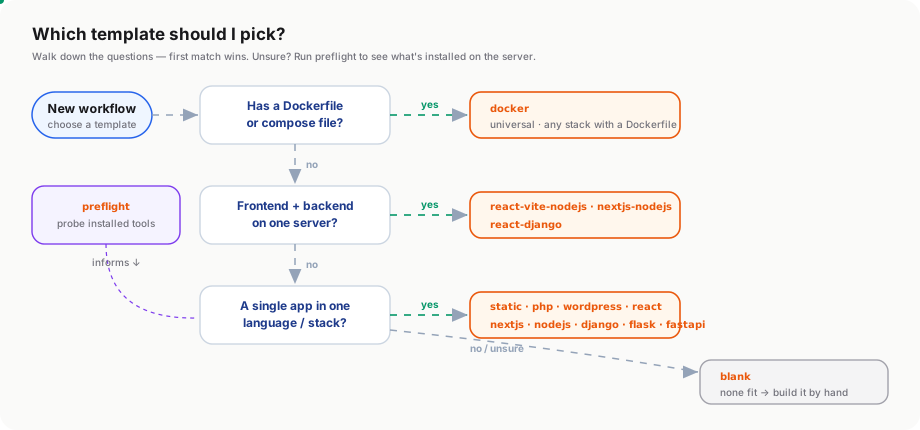
Where they live in the code
frontend/lib/workflow-templates.ts — single file, one array. Add a new template by adding a new entry. The wizard picks them up automatically.
Adding your own
If your stack isn’t covered, the cleanest path is:
- Start from the closest existing template
- Run a
preflightfirst to confirm your tools are present - Build the workflow as
blankand add steps manually - If you’ll reuse the shape — copy your final step graph into
workflow-templates.tsas a new entry and PR it